
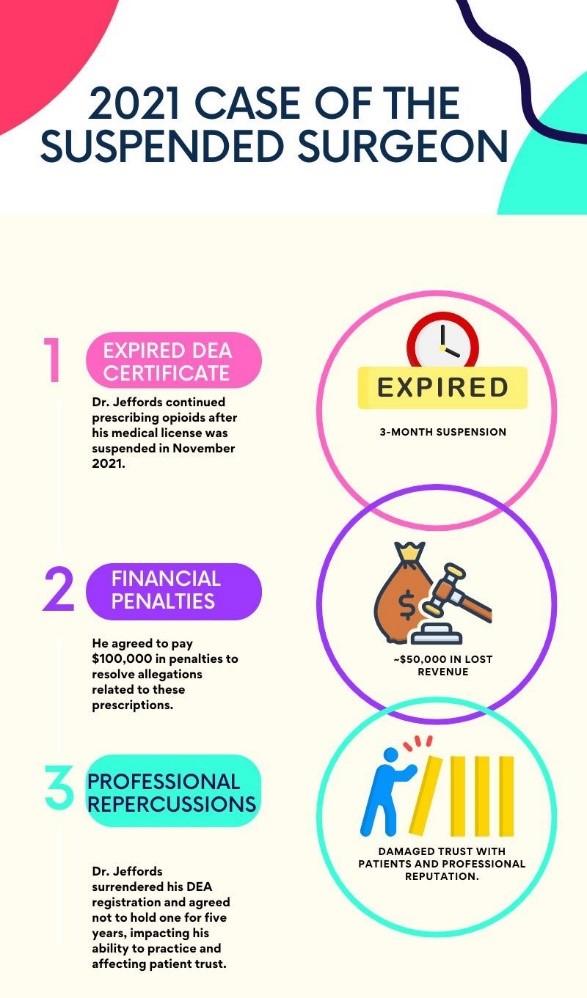
Missing a renewal deadline is more than an inconvenience; it’s a risk to your career, your patients, and your reputation. For healthcare providers, the stakes are high. Operating without up-to-date credentials can lead to disciplinary actions, financial penalties, and even restrictions on your ability to practice. And for your patients, a delayed or canceled appointment due to credential issues can erode trust. To avoid these risks, a systematic credential tracking process is crucial. A proactive approach—supported by the right tools—ensures that renewals are never overlooked, keeping you compliant and your practice running smoothly.
Step-by-Step Guide: Setting Up Your Credential Tracking System
Here’s a practical, step-by-step guide to establishing a system that will keep you on top of all your credential renewal deadlines.
Step 1: Gather All Credential Information in One Place
- Description: Start by creating a comprehensive list of all your licenses, certifications, and any other required credentials. Include details like the issuing authority, expiration date, and renewal requirements.
- Pro Tip: Organize your credentials into categories (e.g., licenses, board certifications, CME records) to make tracking easier.
Why This Matters: Having all your information in one place saves you from scrambling for details later on and ensures nothing slips through the cracks.
Step 2: Set Renewal Reminders in Advance
- Description: Schedule reminders for each credential well before the expiration date. Aim to set two reminders: one at least three months before the deadline and another closer to the date, such as one month out.
- Pro Tip: Use a digital calendar or app that allows recurring reminders to keep these alerts consistent.
Why This Matters: Early reminders give you ample time to complete any necessary documentation or continuing education credits required for renewal.
Step 3: Record Renewal Steps for Each Credential
- Description: For each credential, outline the renewal process in a simple checklist. Include details like required documents, fees, and any additional steps like online submissions or in-person verifications.
- Pro Tip: Save links to online renewal forms and keep digital copies of required documents in an easily accessible folder.
Why This Matters: Having the renewal steps outlined in advance minimizes last-minute confusion and keeps the process efficient.
Step 4: Create a Digital Backup of All Credentials
- Description: Digitize all physical documents and store them securely in an encrypted folder or a trusted digital vault. For each document, include the date it was last updated to stay current.
- Pro Tip: Regularly back up these digital copies to ensure they’re secure and accessible.
Why This Matters: A digital backup prevents the risk of losing essential paperwork and ensures your credentials are accessible even if physical copies are misplaced.
Step 5: Simplify the Process with MiCred’s Automated Solution
- Description: Manual tracking can be overwhelming, especially as the number of credentials grows. MiCred offers a streamlined solution to automate this process. With features like automated reminders and a secure document vault, MiCred takes the hassle out of credential management.
- Pro Tip: Set up MiCred to receive renewal alerts directly on your mobile device and to securely store your credentials for easy access.
Why This Matters: MiCred’s automation tools eliminate the guesswork in renewal tracking, providing peace of mind and reducing the risk of human error.