

Credentialing is a critical part of any healthcare professional’s career, yet it’s also one of the most common sources of frustration. From missed deadlines to misplaced documents, credentialing errors can derail careers, disrupt patient care, and create unnecessary stress.
The good news? These mistakes are entirely avoidable with a proactive approach and the right tools. In this blog, we’ll explore the top credentialing errors healthcare professionals make—and how you can sidestep them with ease. Whether you’re managing your credentials manually or using a tool like MiCred, this guide will help you stay organized and compliant.
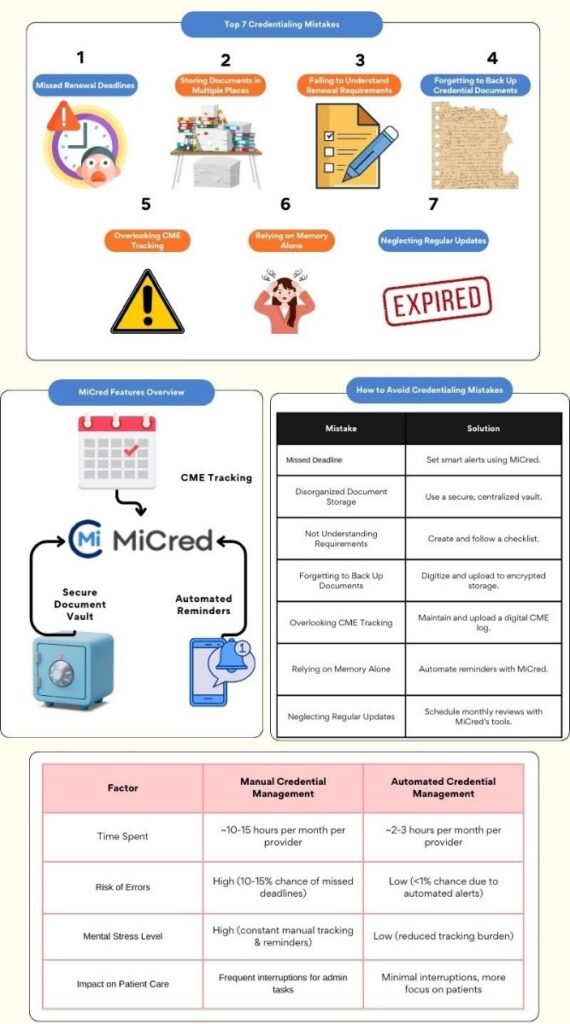
The 7 Most Common Credentialing Mistakes—and How to Avoid Them
1. Missing Renewal Deadlines

It’s easy to lose track of renewal dates, especially when juggling multiple licenses, board certifications, and DEA registrations. A missed renewal can lead to costly penalties, temporary suspension, or even license revocation.
Tip to Avoid: Use a digital calendar or an app like MiCred to automate reminders for each renewal. Set alerts at least three months in advance to give yourself plenty of time to prepare.Why It Matters: Timely renewals ensure uninterrupted practice and protect your professional reputation.
2. Storing Documents in Multiple Places

Many healthcare professionals scatter their credentials across physical drawers, email inboxes, and personal devices. This disorganized approach makes it difficult to locate documents when you need them most.
Tip to Avoid: Consolidate all your credentials into a single, secure system. MiCred’s encrypted vault lets you store and access all your documents from one dashboard, eliminating the need for frantic searches.
Why It Matters: Centralized storage saves time, reduces stress, and ensures your documents are always within reach.
3. Failing to Understand Renewal Requirements
Each credential has unique renewal requirements—whether it’s submitting proof of Continuing Medical Education (CME), paying fees, or completing additional forms. Overlooking these details can delay your renewal process.
Tip to Avoid: Create a checklist for each credential that outlines its specific renewal steps. MiCred makes this even easier by providing a consolidated dashboard with key renewal requirements.
Why It Matters: Clear instructions prevent delays and ensure you meet every requirement on time.
4. Forgetting to Back Up Credential Documents
Lost or damaged documents can create significant headaches when it’s time to renew or verify your credentials. Without backups, you may have to go through time-consuming processes to retrieve duplicates.
Tip to Avoid: Digitize all your credentials and save them in a secure, cloud-based location. MiCred’s document vault offers encrypted storage for easy access and peace of mind.
Why It Matters: A digital backup protects your career by ensuring your documents are safe and retrievable at all times.
5. Overlooking CME Tracking

Many certifications and licenses require a certain number of CME credits for renewal. Failing to track or document these credits can result in renewal delays or compliance issues.
Tip to Avoid: Maintain a dedicated log of CME activities and upload certificates to a digital platform like MiCred.
Why It Matters: Accurate CME tracking keeps you compliant and saves you from last-minute scrambles.
6. Relying on Memory Alone
With busy schedules and complex responsibilities, relying on memory to keep track of deadlines and credential details is a recipe for disaster.
Tip to Avoid: Automate the process with MiCred’s smart alerts, which notify you well in advance of approaching deadlines.
Why It Matters: Automation reduces the risk of human error and ensures nothing slips through the cracks.
7. Neglecting Regular Updates
Credential management isn’t a one-and-done task. Failing to regularly review and update your credentials can lead to expired documents and missed renewals.
Tip to Avoid: Set aside 10 minutes each month to review your credentials. MiCred’s dashboard simplifies this process, showing you which credentials are active, expiring soon, or need immediate attention.
Why It Matters: Regular updates keep you proactive and prepared, ensuring continuous compliance.
How MiCred Can Help You Avoid These Mistakes

Manual credential management is prone to errors, but MiCred takes the guesswork out of the process. Here’s how:
- Automated Alerts: Receive timely reminders for upcoming renewals to avoid missed deadlines.
- Secure Document Vault: Store all your credentials in one encrypted location for easy access.
- Comprehensive Dashboard: View the status of all your credentials at a glance, ensuring you’re always in control.By leveraging MiCred, you’re not just avoiding common mistakes—you’re taking a proactive approach to protecting your career and reputation.
Conclusion
Credentialing mistakes can be costly, but they’re entirely preventable with the right strategies and tools. By avoiding these seven common errors and adopting a system like MiCred, you can stay organized, compliant, and stress-free.